

A Routing Mystery
I’ll never forget the time multiple app teams reported failed integration tests because a specific GitHub runner pool was being blocked by an AWS WAF-protected endpoint. They had not made any recent changes to the WAF, and the exact same tests had run successfully a week prior during the last release. I was asked to investigate the issue, and what I found was surprising, to say the least.
Here is what I knew: the affected runner pool was managed by GitHub, but it was configured with private networking to access internal endpoints on the company network. These runners receive a NIC directly from our Azure VNet subnet. Therefore, all egress traffic should logically either route to internal networks or out to the internet through an Azure NAT Gateway. A quick check confirmed no recent changes had been made to the VNet.
The next step was to identify the source IP getting blocked by the WAF in AWS and compare it to our NAT Gateway IP in Azure. They didn’t match. This confirmed that traffic was no longer egressing through the expected NAT gateway.
To get absolute confirmation, I added a quick step to the workflow to print the runner’s public IP to standard out during the next integration test. As expected, it matched the blocked IP in the WAF logs.
{
  "action": "BLOCK",
  "terminatingRuleId": "AWS-AWSManagedRulesCommonRuleSet",
  "terminatingRuleType": "MANAGED_RULE_GROUP",
  "httpRequest": {
    "clientIp": "52.X.X.X",
    "country": "US",
    "httpMethod": "POST",
    "uri": "/api/v1/integration-test"
  }
}
However, when I performed a reverse lookup on that IP, I discovered it was owned by AWS! How could this be? GitHub-hosted runners operate within the Azure ecosystem, not AWS.
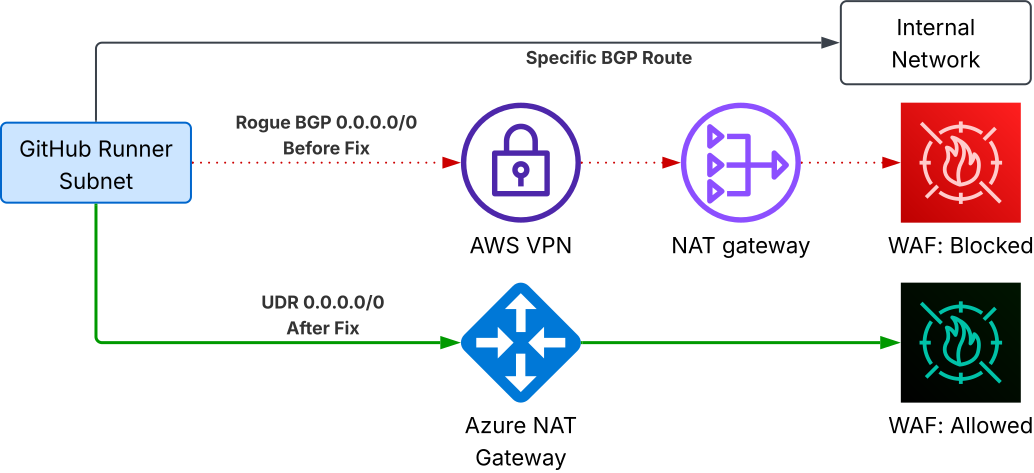
Where was this IP coming from? Then it hit me—another group had recently added a Site-to-Site VPN between Azure and AWS for a completely different project. I looked into the egress gateways on the AWS side, and there it was. The GitHub runner traffic wasn’t egressing through the Azure NAT Gateway at all; it was traversing the VPN and egressing out of AWS.
Digging deeper into the route tables, I realized that a 0.0.0.0/0 default route was being advertised over BGP to my GitHub runner subnet, overriding the default route through the Azure NAT Gateway. I quickly attached a User Defined Route (UDR) to force 0.0.0.0/0 traffic back out to the internet, which the NAT Gateway intercepts. Since UDRs take precedence over BGP-advertised routes in Azure, voilà—issue resolved.
# Create the Route Table for the GitHub Runner Subnet
resource "azurerm_route_table" "runner_rt" {
  name                = "rt-github-runners"
  location            = azurerm_resource_group.main.location
  resource_group_name = azurerm_resource_group.main.name

  # Ensure BGP propagation remains enabled so the runners
  # can still receive specific routes to on-premise networks.
  bgp_route_propagation_enabled = true
}

# Create the explicit User Defined Route (UDR)
# Due to Azure's Longest Prefix Match, specific BGP routes to on-prem networks
# will still take precedence. However, for 0.0.0.0/0 ties, this UDR will override
# the AWS BGP default route, safely directing egress traffic back to the NAT Gateway.
resource "azurerm_route" "force_internet" {
  name                   = "force-internet-outbound"
  resource_group_name    = azurerm_resource_group.main.name
  route_table_name       = azurerm_route_table.runner_rt.name
  address_prefix         = "0.0.0.0/0"
  next_hop_type          = "Internet"
}

# Bind the Route Table to the GitHub Runner Subnet
resource "azurerm_subnet_route_table_association" "runner_rt_assoc" {
  subnet_id      = azurerm_subnet.github_runners.id
  route_table_id = azurerm_route_table.runner_rt.id
}
Key Takeaways:
- Understanding the relationships between subnets, route tables, NAT gateways, and how traffic is routed both ingress and egress is critical.
- Make your routing deterministic. Relying on Azure’s implicit default routes leaves you vulnerable to unexpected BGP advertisements.
- Simple reverse DNS lookups can give you highly valuable clues during troubleshooting.
- Having an up-to-date IPAM solution to query and compare would have allowed me to identify the AWS NAT gateway IP much sooner.
Related Posts

The Ghost in the Fabric: Debugging an Intermittent Oracle RAC Eviction

Solving Enterprise Identity Sprawl at 500-Team Scale